Speaking & Input Routines Tool
Language Learning Tracker: The Mile Log of Spoken Minutes
Straight answer
The Mile Log adds up the minutes you spent speaking your new language, and every 20 make a mile. Try it now: say one line you've already checked, such as one from your cards, out loud, then enter that minute above. Minutes you spend talking on your own count in full. Minutes in a conversation count half, since about half of a conversation is listening. The log keeps a running total, tells you how far you are from the next mile, and stays in your browser.
Log today's minutes
The log needs JavaScript. Print this sheet instead: add alone minutes and half your conversation minutes, and every 20 makes a mile.
| Date | Alone | Conversation | Spoken Minutes | Note |
|---|---|---|---|---|
What is a mile?
A mile is 20 Spoken Minutes. It's this site's own unit, and it records what you said out loud. It isn't a level, and no number of miles means you've reached one.
"How many days make one mile at each daily amount" from Conversation Mile (https://conversationmile.com/routines/mile-log/). CC BY 4.0 (creativecommons.org/licenses/by/4.0)
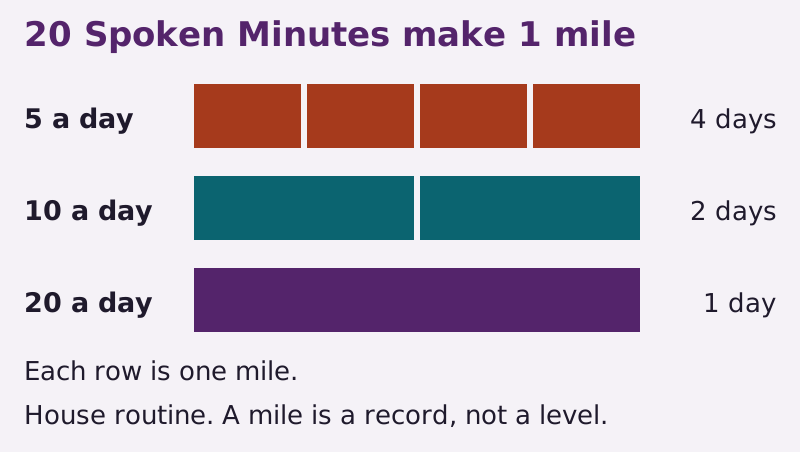
The daily amounts on this site are 5, 10 or 20 Spoken Minutes. At 5 a day, a mile takes four days. At 10 it takes two, and at 20 it takes one. Over the 90 days of the 90-day plan, every single day at 5, 10 or 20 adds up to 22.5, 45 or 90 miles.
Nothing here counts days in a row. Miss a day and nothing resets. Your total stays where it was, and the next day adds to it. The shadowing page has the full rules for what counts as a Spoken Minute.
How do you log a day?
Enter the date, then two numbers: the minutes you spoke alone and the minutes you spent in a conversation. Add a note if you like, such as the clip you shadowed or who you talked to.
"How one day goes into the Mile Log" from Conversation Mile (https://conversationmile.com/routines/mile-log/). CC BY 4.0 (creativecommons.org/licenses/by/4.0)
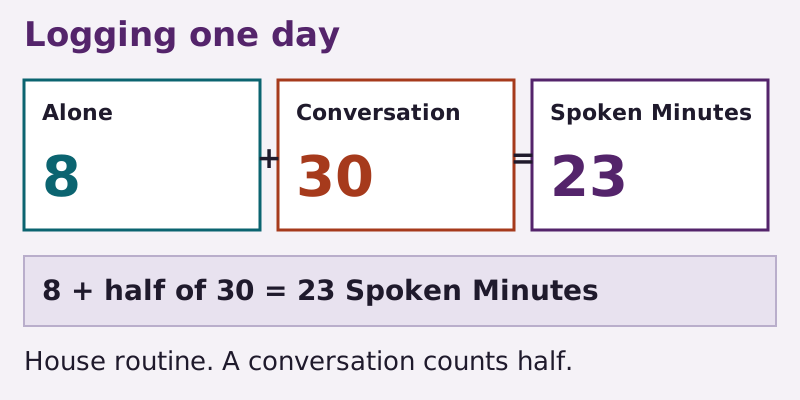
"Alone" covers shadowing, reading aloud, talking to yourself and answering recordings, the tasks on speaking practice alone. "Conversation" covers a tutor lesson at its full clock length, or the minutes of a language exchange spent in your new language, which may not be exactly half, also at clock length. Don't halve it yourself. The log halves it for you. Say an exchange runs an hour and 30 minutes of it are in your new language: enter 30, not 60 and not 15, and the log counts 15.
Say you shadowed for 8 minutes and had a 30-minute lesson. Enter 8 and 30. The log halves the 30, so that's 8 plus 15, or 23 Spoken Minutes.
There's no need to be exact. For time alone, a rough count of the minutes you were speaking is enough. A tutor lesson needs only its rough clock length. For an exchange, enter the rough minutes in your new language.
You can log more than once on the same date. Each row is added to the total.
Where does your log live?
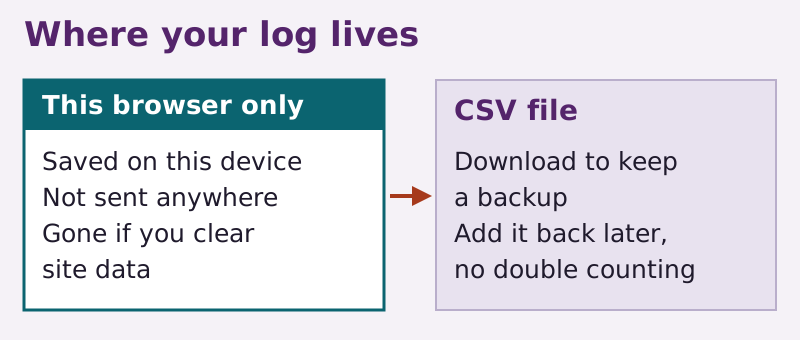
In this browser, on this device, and nowhere else. Nothing you enter is sent to a server, and this site never sees it.
"Where the Mile Log keeps your entries" from Conversation Mile (https://conversationmile.com/routines/mile-log/). CC BY 4.0 (creativecommons.org/licenses/by/4.0)
Three things follow from that. Anyone using the same browser can see the log. Clearing this site's data erases it, and a private window may not keep it at all. This site has no copy, so it can't get your entries back.
So download the CSV now and then. It has five columns, named date, solo_minutes, conversation_minutes, spoken_minutes and note: the date, minutes alone, minutes in conversation, Spoken Minutes and your note.
To move to a new device, or to restore a backup, add the file back. The log works out spoken_minutes again from solo_minutes and conversation_minutes, so a change you make only to that column won't stay. Rows that match exactly aren't added twice, so loading the same file again won't double your miles. If a row in the file has a problem, such as a date that doesn't exist, the log skips it and tells you which row.
Without JavaScript, or if you'd rather use paper, the page shows a blank sheet you can print. Paper has no automatic halving, so on paper you halve the conversation minutes yourself: add the minutes alone and half the conversation minutes, and count a mile for every 20. The privacy page has more on what stays in your browser.
Tomorrow, before you open anything, do a Cold Say-Back: say a line you've already checked, such as one from your cards, from memory, then log that minute too.
Sources
- MDN contributors. "Window: localStorage property." MDN Web Docs, Mozilla Open. Read: The description section, on how long stored data lasts and on private browsing. License: CC BY-SA 2.5.
Next stops
Cite this page
Language Learning Tracker: The Mile Log of Spoken Minutes. Conversation Mile, 2026-11-10. https://conversationmile.com/routines/mile-log/
Corrections
No corrections on this page. Spotted a language error? Please tell this site.