Words That Stick How-to
How to Use Anki With Sentence Cards You Say Aloud
Straight answer
Make every Anki card a whole sentence. Say it out loud before you show the answer. Try that habit now, without Anki.
Read this English line: "Where is the train station?" Cover the page and say it in your language. Then look back and check: ¿Dónde está la estación de tren? in Spanish, Où est la gare ? in French, or Wo ist der Bahnhof? in German.
That was one review. This page shows how to build a card for it, how to review it out loud and how many new cards to add. Anki's buttons and menus come from its own manual. The card layout and the numbers are this site's House routine, untested with learners.
What goes on a sentence card?
The English goes on the front. The sentence in your language goes on the back, with where you found it and a short note.
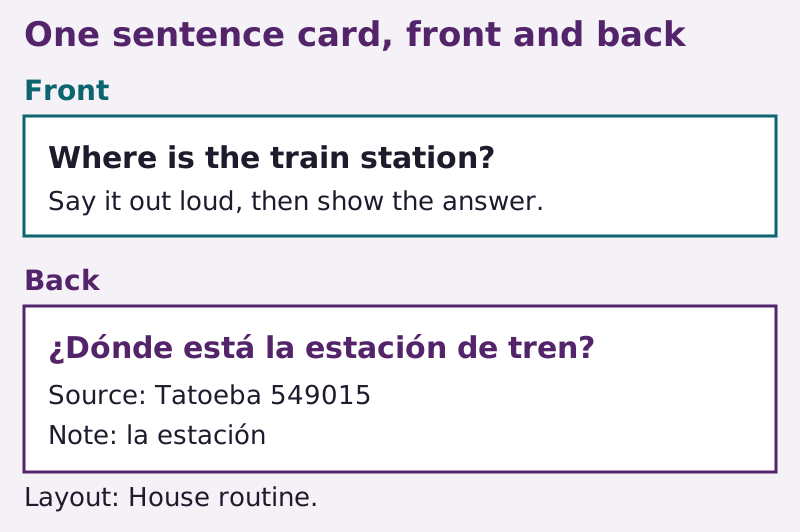
"A sentence card with English on the front and the sentence on the back" from Conversation Mile (https://conversationmile.com/vocabulary/how-to-use-anki/). CC BY 4.0 (creativecommons.org/licenses/by/4.0)
Anki's manual calls a card like this a production card, since it asks you to produce the foreign words. The other direction, foreign words on the front, is a recognition card. This site starts with production because speaking is the goal (House routine).
| Field | What goes in it | Example |
|---|---|---|
| Sentence | The sentence, copied exactly | Wo ist der Bahnhof? |
| English | What it means | Where is the railroad station? |
| Source | Where it came from | Tatoeba 544538 |
| Note | Region, register, or the noun's article | der Bahnhof |
The picture is a Spanish card, Tatoeba 549015, whose English says "train station." The table is a German card, Tatoeba 544538, whose English says "railroad station." Each keeps its own source's wording.
Keep it to one short sentence a card. The manual says shorter cards are easier to review, and it advises language learners against long lists of single words. It also says shared decks work best as a supplement to what you learn elsewhere. So build your own cards from sentences you met. Sentence mining shows where to find them, the first 1,000 words gives common words to look for, and the input menu helps you pick what to read or hear.
How do you set it up in Anki?
Anki stores what you type as a note, and a note holds fields. A card type decides which fields show on the front and which on the back. Here's the setup, with the menu names from the manual.
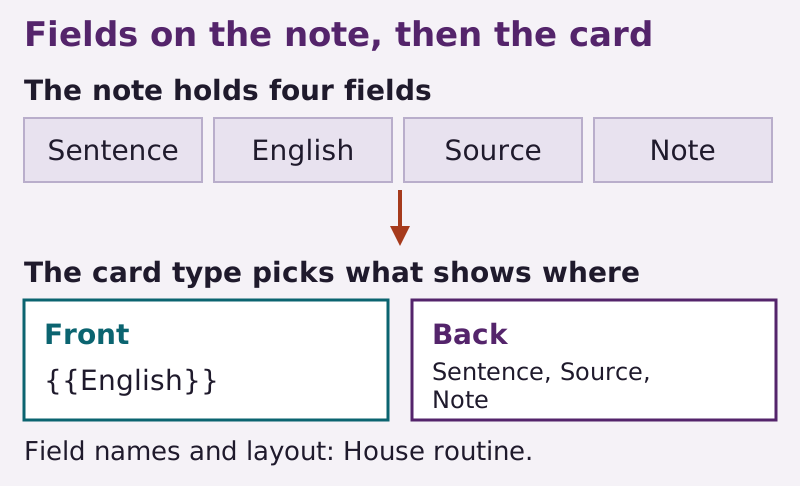
"How the fields on an Anki note become the front and back of a card" from Conversation Mile (https://conversationmile.com/vocabulary/how-to-use-anki/). CC BY 4.0 (creativecommons.org/licenses/by/4.0)
- Make one deck for the language. The manual says decks work best for broad topics, not for a single lesson.
- Make a note type. Go to Tools > Manage Note Types, click Add, base it on Basic and name it after the language.
- Set the fields. Click Fields... and rename or add fields until you have Sentence, English, Source and Note.
- Set the card. Click Cards.... Make sure the front template shows only the English field, and put the Sentence, Source and Note fields on the back, as in the picture above. Check the front before you add notes, or you'll be reading the sentence instead of saying it.
- Add a note. Click Add, check the note type and the deck at the top, fill in the fields and press Ctrl+Enter (Command+Enter on a Mac).
Put Sentence first. Anki checks the first field for duplicates, so it will warn you if you add the same sentence twice.
Tags help too. The manual's own example tag is check_with_tutor. It fits this use well. Give that tag to any sentence you're unsure of, then bring those to your next lesson. The tutor agenda has room for them.
If you also want a recognition card, the standard Basic (and reversed card) note type makes two cards from one note. This site starts with one card per note to keep the daily count down (House routine).
How do you review a card out loud?
Say the whole sentence before you press anything. Then check it word by word.
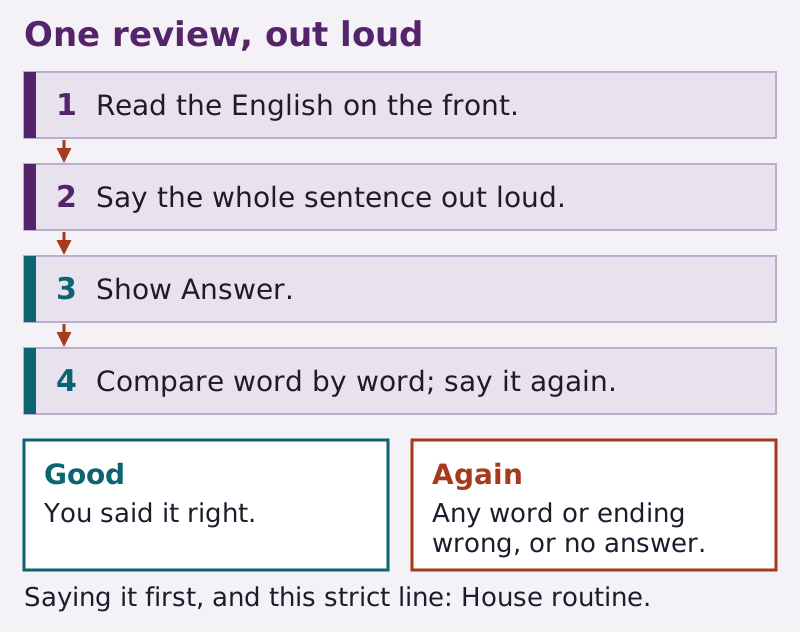
"Reviewing an Anki sentence card out loud" from Conversation Mile (https://conversationmile.com/vocabulary/how-to-use-anki/). CC BY 4.0 (creativecommons.org/licenses/by/4.0)
| Step | What you do |
|---|---|
| 1 | Read the English on the front. |
| 2 | Say the sentence out loud, all of it. |
| 3 | Press Show Answer, or the space bar. |
| 4 | Compare what you said with the back. |
| 5 | With the back still showing, say the whole sentence once more. |
| 6 | Press Good if every word and ending was right the first time, Again if not. |
The manual says you can use just those two buttons. It also asks you to be strict: an answer that's partly right, but would fail in real life, counts as a fail. This site's line for sentence cards is stricter, the same as for a Cold Say-Back: if one word or one ending was wrong, press Again (House routine).
If you can't come up with it in about 10 seconds, the manual suggests showing the answer and moving on, and its Again covers an answer you couldn't recall. So press Again then too.
One more step from this site (House routine): after you show the answer and before you press a button, say the sentence once more while the back is showing. The button still grades only your first try.
Watch the space bar. The manual says Space shows the answer, and once the answer is up, Space presses Good. Use the 1 key for Again.
Under More while you review, Record Own Voice lets you record yourself, and Replay Own Voice plays it back. The manual says this recording is temporary and goes away when you move to the next card.
The saying counts as Spoken Minutes. The reading and checking don't. The shadowing page has the full rules. Writing new cards sits outside the timer too.
How many new cards should you add each day?
Two, on a day when card writing comes around (House routine). In the 90-day plan, writing cards is one of the jobs that take turns, so on 5 or 10 Spoken Minutes that's about every third day. Set New cards/day to 2 in the deck options, so new cards come in no faster than that.
The manual lists three kinds of daily limit: Preset, which changes every deck that shares the preset, This deck and Today only. Pick This deck if other decks share the preset.
| Deck option | What the manual says it does | This site's use |
|---|---|---|
| New cards/day | Limits how many new cards you see each day. Missed days don't pile up extra new cards | Set it to 2 |
| Maximum reviews/day | Caps how many review cards you see in a day | Leave it as it is |
New cards don't stay new. The manual says each one raises your daily reviews for a while, and gives an example: learning about 20 new cards every day can mean roughly 200 reviews a day. Cutting new cards brings that down. If reviews pile up, the manual suggests stopping new cards until you catch up.
Some cards keep failing. Anki calls them leeches. The manual says that when a card has lapsed 8 times, Anki tags the note as a leech and suspends the card, and that both the number and whether it suspends can be changed in the deck options. So check what your deck options are set to do.
The manual's main fix is to change how the card presents the material. For a sentence card, this site swaps in a shorter sentence (House routine), but not one you cut down yourself, since dropping words can break the line. Take a shorter one from a source, copied exactly, or ask a tutor to write one down for you.
If the sentence isn't worth the time, the manual says you can delete it.
Where does Anki fit in a 5, 10 or 20 minute day?
After the Cold Say-Back, never before it. A Cold Say-Back means saying a line from at least a night ago with nothing in front of you, and Anki puts a prompt in front of you. So that comes first, with Anki closed.
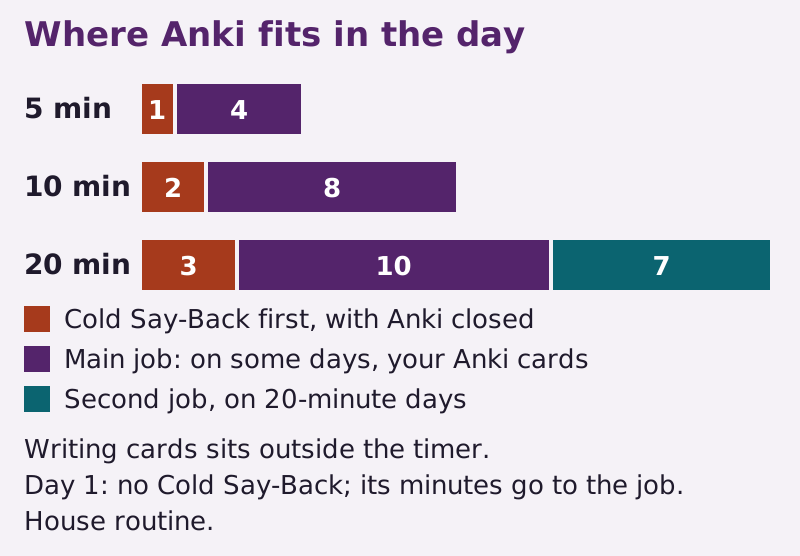
"Where Anki fits in 5, 10 or 20 Spoken Minutes" from Conversation Mile (https://conversationmile.com/vocabulary/how-to-use-anki/). CC BY 4.0 (creativecommons.org/licenses/by/4.0)
| Daily amount | Cold Say-Back, first | Main job | Second job |
|---|---|---|---|
| 5 | 1 | 4 | None |
| 10 | 2 | 8 | None |
| 20 | 3 | 10 | 7 |
In the 90-day plan, cards show up from day 15. Writing two sentence cards is one job, and a run through your older cards is another; they take turns with short audio clips, one job a day on 5 or 10 Spoken Minutes and two on 20.
On a card-writing day, typing the two cards sits outside the timer. Then the job's minutes go to saying those two sentences out loud from the cards you just wrote; if this job's time is left, go around them again. On 20, the plan's second job still gets its own minutes.
Add only those two cards that day. Keep any extra sentences on paper for a later card-writing day, which still gets only two. Log the minutes in the Mile Log.
The manual names Anki, AnkiMobile, AnkiDroid and AnkiWeb as one family of apps, all linked from Anki's official site. Any of them can hold these cards. Use the one you'll actually open.
The menu names on this page come from the manual for the computer version. AnkiMobile has its own manual, and the phone apps may lay things out differently.
Tomorrow, before you open Anki or anything else, say your station sentence once with nothing in front of you. Then check it on this page.
What this rests on
Checked against
- The manual being the desktop manual, with AnkiMobile covered separately; cards, notes, fields, card types and note types, recognition and production cards, Basic (and reversed card), decks for broad topics, and shared decks as a supplement Source 1
- Making a note type, renaming fields, adding notes with tags, the duplicate check on the first field, and keeping cards short Source 2
- Show Answer, moving on after about 10 seconds, Again for an answer you couldn't recall, using only Again and Good, counting a partly right answer as a fail, Space showing the answer and then pressing Good, and Record Own Voice Source 3
- New cards/day, the Preset, This deck and Today only limits, new cards raising the daily reviews, the 20 new and about 200 reviews example, and pausing new cards when behind Source 4
- Leeches: the manual's 8 lapses, the tag and the suspend, both adjustable in the deck options, and fixing a leech by changing how the card presents the material Source 5
- All example sentences Source 6
House routine
- The sentence card layout with English on the front, the four field names, and starting with one card per note
- Saying the whole sentence out loud before Show Answer, comparing word by word, pressing Again for one wrong word or ending or after 10 seconds, and saying it once more after you see it
- Two new sentence cards on a day when card writing comes around, New cards/day set to 2 for this deck, leaving Maximum reviews/day alone, swapping a leech for a shorter sentence from a source or a tutor, saying the new sentences on a card-writing day, and keeping extras on paper
- Where the card run fits in 5, 10 and 20 Spoken Minutes, with the Cold Say-Back first and card writing outside the timer
Sources
- Anki contributors. "Getting Started." Anki Manual Open. Read: Full page: cards, card states, decks, notes and fields, card types, note types, shared decks.. License: CC BY-SA 4.0.
- Anki contributors. "Adding/Editing." Anki Manual Open. Read: Adding Cards and Notes, Duplicate Check, Effective Learning, Adding a Note Type, the first part of Customizing Fields.. License: CC BY-SA 4.0.
- Anki contributors. "Studying." Anki Manual Open. Read: Decks, Study Overview, Questions, Answer Buttons, Editing and More.. License: CC BY-SA 4.0.
- Anki contributors. "Deck Options." Anki Manual Open. Read: Opening section, Presets, Daily Limits (New Cards/Day, Maximum Reviews/Day, New Cards Ignore Review Limit).. License: CC BY-SA 4.0.
- Anki contributors. "Leeches." Anki Manual Open. Read: Opening section and Editing, Deleting.. License: CC BY-SA 4.0.
- Tatoeba. Sentence collection, downloaded exports. Tatoeba Open. Read: The three sentences on this page and their linked English read one by one. Authors are credited under Sentence credits.. License: CC BY 2.0 FR.
Sentence credits
- ¿Dónde está la estación de tren? Tatoeba sentence 549015 by Shishir; English by CM. CC BY 2.0 FR.
- Où est la gare ? Tatoeba sentence 136614 by Aiji; English by CM. CC BY 2.0 FR.
- Wo ist der Bahnhof? Tatoeba sentence 544538 by jakov; English by CM. CC BY 2.0 FR.
Next stops
Cite this page
How to Use Anki With Sentence Cards You Say Aloud. Conversation Mile, 2026-11-10. https://conversationmile.com/vocabulary/how-to-use-anki/
Corrections
No corrections on this page. Spotted a language error? Please tell this site.